数据绑定(Data Binding)
仅当 RiveWidget 上的 Data Binding Mode 设置为 Manual 时,才需要使用这些 API。否则,您可以直接在 Unity 检查器的 Data 部分配置视图模型绑定。
private void OnEnable()
{
    riveWidget.OnWidgetStatusChanged += HandleWidgetStatusChanged;
}

private void OnDisable()
{
    riveWidget.OnWidgetStatusChanged -= HandleWidgetStatusChanged;
}

private void HandleWidgetStatusChanged()
{
    if (riveWidget.Status == WidgetStatus.Loaded)
    {
        File file = riveWidget.File;

        // 按名称获取引用
        ViewModel viewModel = file.GetViewModelByName("My View Model");

        // 按索引获取引用
        for (int i = 0; i < file.ViewModelCount; i++)
        {
            ViewModel indexedVM = file.GetViewModelAtIndex(i);
        }

        // 获取画板的默认视图模型引用
        ViewModel defaultVM = riveWidget.Artboard.DefaultViewModel;
    }
}
仅当 RiveWidget 上的 Data Binding Mode 设置为 Manual 时,才需要使用这些 API。否则,您可以直接在 Unity 检查器的 Data 部分配置视图模型绑定。
private void OnEnable()
{
    riveWidget.OnWidgetStatusChanged += HandleWidgetStatusChanged;
}

private void OnDisable()
{
    riveWidget.OnWidgetStatusChanged -= HandleWidgetStatusChanged;
}

private void HandleWidgetStatusChanged()
{
    if (riveWidget.Status == WidgetStatus.Loaded)
    {
        ViewModel vm = riveWidget.File.GetViewModelByName("My View Model");

        // 创建空白实例
        ViewModelInstance vmiBlank = vm.CreateInstance();

        // 创建默认实例
        ViewModelInstance vmiDefault = vm.CreateDefaultInstance();

        // 按索引创建
        for (int i = 0; i < vm.InstanceCount; i++)
        {
            ViewModelInstance vmiIndexed = vm.CreateInstanceAt(i);
        }

        // 按名称创建
        ViewModelInstance vmiNamed = vm.CreateInstanceByName("My Instance");
    }
}
// 使用 Unity Inspector
// 1. 在 Inspector 中选择 RiveWidget
// 2. 在 "Data" 部分,设置 Data Binding Mode:
//    - Auto Bind Default:绑定默认视图模型实例以及任何全局视图模型
//    - Auto Bind Selected:使用下拉菜单中选中的特定实例,并加上任何全局视图模型
//    - Manual:需要在代码中手动设置绑定

// 或者通过编程方式(设置为 Manual 或使用底层 API 时)
private void OnEnable()
{
    riveWidget.OnWidgetStatusChanged += HandleWidgetStatusChanged;
}

private void OnDisable()
{
    riveWidget.OnWidgetStatusChanged -= HandleWidgetStatusChanged;
}

private void HandleWidgetStatusChanged()
{
    if (riveWidget.Status == WidgetStatus.Loaded)
    {
        ViewModel vm = riveWidget.Artboard.DefaultViewModel;
        ViewModelInstance vmi = vm.CreateDefaultInstance();

        // 应用到状态机将自动绑定到其画板
        riveWidget.StateMachine.BindViewModelInstance(vmi);
    }
}
BindViewModelInstance(vmi) 将 vmi 绑定为主实例。空的全局视图模型槽位会同时被默认实例填充。若想在该调用中提供自己的全局实例,请传入一个名称到实例的字典。
📌 组件 API(推荐)
Rive Widget 提供了可视化和编程两种方式来配置自动绑定。在检查器中,您可以通过数据绑定模式下拉菜单轻松设置绑定:
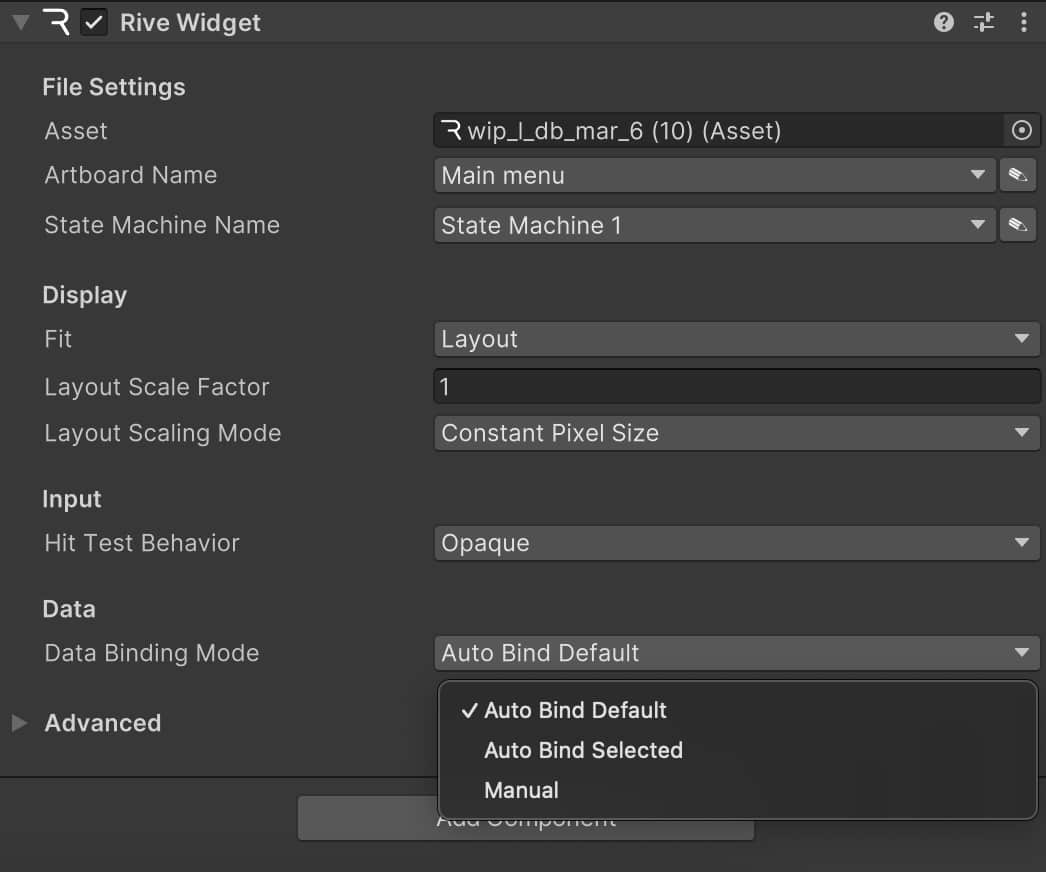
要以编程方式启用自动绑定,请使用以下 API:
// 在 Widget 加载之前设置:

// 选项 1:自动绑定默认实例(以及任何全局视图模型的默认实例)
riveWidget.BindingMode = DataBindingMode.AutoBindDefault;

// 选项 2:按名称自动绑定特定实例(以及任何全局视图模型的默认实例)
riveWidget.BindingMode = DataBindingMode.AutoBindSelected;
riveWidget.ViewModelInstanceName = "My Instance";

// 设置绑定模式后加载 Rive 文件
riveWidget.Load(riveFile, artboardName, stateMachineName);

...
// 访问已自动绑定的当前实例
ViewModelInstance boundInstance = riveWidget.StateMachine.ViewModelInstance;
📌 旧版 API
如果您选择使用底层 API 来控制渲染循环,则需要在脚本中手动设置数据绑定。
作为参考,请查看此 RiveScreen 示例,它演示了如何在自定义渲染循环中实现自动绑定的一种方式。
使用底层 API 需要额外的实现工作以及对 Rive 运行时的理解。除非您有特殊需求需要设置自定义渲染循环,否则我们建议使用组件 API。
全局视图模型(Global View Models)
在编辑器中标记为 global 的视图模型不属于单个画板。文件为每个全局视图模型保留一个命名槽位,因此同一文件中的每个画板都能读取相同的属性。适用于应用级状态,例如主题、区域设置或设置。请参阅编辑器文档中的全局视图模型实例。
使用 File.GlobalViewModelNames 列出文件中的全局视图模型。Rive 资源检查器也会将它们标注为 (Global)。
foreach (string name in riveWidget.File.GlobalViewModelNames)
{
    Debug.Log($"Global: {name}");
}
这些槽位的填充方式取决于 Widget 的 Data Binding Mode:
- Auto Bind Default 与 Auto Bind Selected 在加载时绑定。它们会在画板有主视图模型时绑定主实例,并为每个空的全局视图模型创建默认实例。即使画板没有主视图模型,只要文件包含全局视图模型,仍然会进行 Auto Bind。
- Manual 在加载时不绑定任何内容。你需要自己创建主实例和任何全局实例,然后进行绑定。
如果 Auto Bind Selected 使用的实例名称不存在,则不会绑定任何内容,包括全局视图模型。
在 Auto Bind 加载完成或显式调用 BindViewModelInstance 之前,GetGlobalViewModelInstance 返回 null。
ViewModelInstance labels = riveWidget.StateMachine.GetGlobalViewModelInstance("Labels");
if (labels != null)
{
    ViewModelInstanceStringProperty currency = labels.GetStringProperty("currency");
    Debug.Log(currency.Value);
}
Auto Bind 后覆盖全局视图模型
Auto Bind 会用默认实例填充每个全局视图模型。若要在运行时替换其中某些默认值,请重新绑定,并传入 Widget 当前的主实例以及你想更改的全局视图模型。字典中未列出的全局视图模型将保持已有的实例。
riveWidget.BindingMode = DataBindingMode.AutoBindDefault;
riveWidget.Load(file);

var globals = new Dictionary<string, ViewModelInstance>
{
    { "Colors", file.GetViewModelByName("Colors").CreateDefaultInstance() },
    { "Labels", file.GetViewModelByName("Labels").CreateInstanceByName("US") },
};

riveWidget.StateMachine.BindViewModelInstance(
    riveWidget.StateMachine.ViewModelInstance,
    globals);
手动绑定
使用 Manual 模式时,Load 之后不会绑定任何内容。创建主实例和全局实例,然后将它们一起绑定。
riveWidget.BindingMode = DataBindingMode.Manual;
riveWidget.Load(file);

ViewModelInstance main = riveWidget.Artboard.DefaultViewModel.CreateDefaultInstance();
var globals = new Dictionary<string, ViewModelInstance>
{
    { "Colors", file.GetViewModelByName("Colors").CreateDefaultInstance() },
    { "Labels", file.GetViewModelByName("Labels").CreateInstanceByName("US") },
};

riveWidget.StateMachine.BindViewModelInstance(main, globals);
双参数重载在以下情况会返回 false 并保持状态机不变:主实例已被释放、字典键不是文件中的全局视图模型、或值为 null/已被释放。null 字典被视为空:在首次绑定时,省略的全局视图模型仍会获得默认值。
仅绑定全局视图模型
将主实例传为 null,即可在不提供主实例的情况下绑定全局视图模型。绑定会在画板有默认视图模型时创建一个默认主实例,并仍然填充你在字典中省略的全局视图模型。
riveWidget.StateMachine.BindViewModelInstance(
    null,
    new Dictionary<string, ViewModelInstance>
    {
        { "Labels", file.GetViewModelByName("Labels").CreateInstanceByName("US") },
    });

// 不传覆盖项进行绑定。这与 Auto Bind 使用的填充默认值路径相同:
riveWidget.StateMachine.BindViewModelInstance(null);
在多个 Widget 之间共享全局视图模型
Auto Bind 会为每个 Widget 创建新的默认实例,因此这些默认值不会共享。若要共享全局视图模型且避免重复绑定,请将两个 Widget 都设为 Manual,然后在每个 Widget 的首次绑定中传入同一个实例。
widgetA.BindingMode = DataBindingMode.Manual;
widgetB.BindingMode = DataBindingMode.Manual;
widgetA.Load(file);
widgetB.Load(file);

ViewModelInstance sharedLabels = file.GetViewModelByName("Labels").CreateInstanceByName("US");
var globals = new Dictionary<string, ViewModelInstance> { { "Labels", sharedLabels } };

ViewModelInstance mainA = widgetA.Artboard.DefaultViewModel.CreateDefaultInstance();
ViewModelInstance mainB = widgetB.Artboard.DefaultViewModel.CreateDefaultInstance();

widgetA.StateMachine.BindViewModelInstance(mainA, globals);
widgetB.StateMachine.BindViewModelInstance(mainB, globals);

// 通过 A 修改,在 B 中可见。
sharedLabels.GetStringProperty("currency").Value = "$";
Widget 不一定必须处于 Manual 模式。你也可以在 Auto Bind 之后,通过传入每个 Widget 当前的主实例和共享字典来绑定共享全局视图模型。这里展示 Manual 是为了避免不必要的第二次绑定。
var vm = riveWidget.File.GetViewModelByName("My View Model");

// 属性列表
var properties = vm.Properties;
foreach (var prop in properties)
{
    Debug.Log($"Property: {prop.Name}, Type: {prop.Type}");
}
private void HandleWidgetStatusChanged()
{
    if (riveWidget.Status == WidgetStatus.Loaded)
    {
        ViewModelInstance viewModelInstance = riveWidget.StateMachine.ViewModelInstance;

        // 字符串属性
        ViewModelInstanceStringProperty stringProperty = viewModelInstance.GetStringProperty("title");
        Debug.Log($"String value: {stringProperty.Value}");
        stringProperty.Value = "New Text";

        // 数值属性
        ViewModelInstanceNumberProperty numberProperty = viewModelInstance.GetNumberProperty("count");
        Debug.Log($"Number value: {numberProperty.Value}");
        numberProperty.Value = 42.5f;

        // 布尔属性
        ViewModelInstanceBooleanProperty boolProperty = viewModelInstance.GetBooleanProperty("isActive");
        Debug.Log($"Boolean value: {boolProperty.Value}");
        boolProperty.Value = true;

        // 颜色属性
        ViewModelInstanceColorProperty colorProperty = viewModelInstance.GetColorProperty("backgroundColor");
        Color currentColor = colorProperty.Value;
        colorProperty.Value = new UnityEngine.Color(1, 0, 0, 1); // 红色
        Color32 currentColor32 = colorProperty.Value32;
        colorProperty.Value32 = new Color32(0, 255, 0, 255); // 绿色

        // 枚举属性
        ViewModelInstanceEnumProperty enumProperty = viewModelInstance.GetEnumProperty("category");
        Debug.Log($"Enum current value: {enumProperty.Value}");
        Debug.Log($"Enum available values: {string.Join(", ", enumProperty.EnumValues)}");
        enumProperty.Value = "option_name";

        // 触发器属性
        ViewModelInstanceTriggerProperty triggerProperty = viewModelInstance.GetTriggerProperty("onSubmit");
        triggerProperty.Trigger(); // 触发
    }
}
if (riveWidget.Status == WidgetStatus.Loaded)
{
    var viewModelInstance = riveWidget.StateMachine.ViewModelInstance;

    // 使用链式调用访问嵌套视图模型
    var nestedNumberByChain = viewModelInstance
        .GetViewModelInstanceProperty("My Nested View Model")
        .GetViewModelInstanceProperty("My Second Nested VM")
        .GetNumberProperty("My Nested Number");

    // 使用路径表示法访问嵌套属性
    var nestedNumberByPath = viewModelInstance
        .GetNumberProperty("My Nested View Model/My Second Nested VM/My Nested Number");
}
private ViewModelInstanceNumberProperty numberProperty;
private ViewModelInstanceStringProperty stringProperty;
private ViewModelInstanceBooleanProperty boolProperty;
private ViewModelInstanceColorProperty colorProperty;
private ViewModelInstanceEnumProperty enumProperty;
private ViewModelInstanceTriggerProperty triggerProperty;

private void HandleWidgetStatusChanged()
{
    if (riveWidget.Status == WidgetStatus.Loaded)
    {
        ViewModelInstance viewModelInstance = riveWidget.StateMachine.ViewModelInstance;

        // 为属性添加监听器
        numberProperty = viewModelInstance.GetNumberProperty("count");
        numberProperty.OnValueChanged += OnNumberPropertyChanged;

        stringProperty = viewModelInstance.GetStringProperty("title");
        stringProperty.OnValueChanged += OnStringPropertyChanged;

        boolProperty = viewModelInstance.GetBooleanProperty("isActive");
        boolProperty.OnValueChanged += OnBoolPropertyChanged;

        colorProperty = viewModelInstance.GetColorProperty("backgroundColor");
        colorProperty.OnValueChanged += OnColorPropertyChanged;

        enumProperty = viewModelInstance.GetEnumProperty("category");
        enumProperty.OnValueChanged += OnEnumPropertyChanged;

        triggerProperty = viewModelInstance.GetTriggerProperty("onSubmit");
        triggerProperty.OnTriggered += OnTriggerPropertyFired;
    }
}

private void OnNumberPropertyChanged(float newValue) { Debug.Log($"Number changed to: {newValue}"); }
private void OnStringPropertyChanged(string newValue) { Debug.Log($"String changed to: {newValue}"); }
private void OnBoolPropertyChanged(bool newValue) { Debug.Log($"Boolean changed to: {newValue}"); }
private void OnColorPropertyChanged(UnityEngine.Color newValue) { Debug.Log($"Color changed to: {ColorUtility.ToHtmlStringRGBA(newValue)}"); }
private void OnEnumPropertyChanged(string newValue) { Debug.Log($"Enum changed to: {newValue}"); }
private void OnTriggerPropertyFired() { Debug.Log("Trigger fired!"); }

private void OnDestroy()
{
    numberProperty.OnValueChanged -= OnNumberPropertyChanged;
    stringProperty.OnValueChanged -= OnStringPropertyChanged;
    boolProperty.OnValueChanged -= OnBoolPropertyChanged;
    colorProperty.OnValueChanged -= OnColorPropertyChanged;
    enumProperty.OnValueChanged -= OnEnumPropertyChanged;
    triggerProperty.OnTriggered -= OnTriggerPropertyFired;
}
[SerializeField] private ImageOutOfBandAsset m_lightImageAsset;
[SerializeField] private ImageOutOfBandAsset m_darkImageAsset;

private ViewModelInstanceImageProperty imageProperty;
private bool isDarkMode = false;

private void HandleWidgetStatusChanged()
{
    if (riveWidget.Status == WidgetStatus.Loaded)
    {
        m_lightImageAsset.Load();
        m_darkImageAsset.Load();
        ViewModelInstance viewModelInstance = riveWidget.StateMachine.ViewModelInstance;

        imageProperty = viewModelInstance.GetImageProperty("profileImage");
        imageProperty.OnValueChanged += OnImageChanged;
        imageProperty.Value = m_lightImageAsset; // 初始设置为亮色模式
    }
}

public void ToggleTheme()
{
    if (imageProperty != null)
    {
        isDarkMode = !isDarkMode;
        imageProperty.Value = isDarkMode ? m_darkImageAsset : m_lightImageAsset;
    }
}

public void ClearImage()
{
    if (imageProperty != null) imageProperty.Value = null;
}

private void OnDestroy()
{
    m_lightImageAsset.Unload();
    m_darkImageAsset.Unload();
    if (imageProperty != null) imageProperty.OnValueChanged -= OnImageChanged;
}
有关 Unity 中图像数据绑定的演示,请参阅 Rive Unity 示例仓库 中的 Image Data Binding 场景。
Fonts(字体)
字体属性允许你在运行时更换绑定文本所使用的字体。将加载好的 FontOutOfBandAsset 赋值给该属性的 Value。在设置 Value 之前调用 Load(),在不再需要该字体时调用 Unload()。与运行时资源替换不同,这种方式只更改绑定到该字体属性的文本,因此文件的不同部分可以使用不同字体。
Value 是只写的。
[SerializeField] private FontOutOfBandAsset m_headingFont;

private ViewModelInstanceFontProperty fontProperty;

private void OnEnable()
{
    riveWidget.OnWidgetStatusChanged += HandleWidgetStatusChanged;
}

private void OnDisable()
{
    riveWidget.OnWidgetStatusChanged -= HandleWidgetStatusChanged;
}

private void HandleWidgetStatusChanged()
{
    if (riveWidget.Status == WidgetStatus.Loaded)
    {
        m_headingFont.Load();
        ViewModelInstance viewModelInstance = riveWidget.StateMachine.ViewModelInstance;

        fontProperty = viewModelInstance.GetFontProperty("headingFont");
        // 或者:
        // fontProperty = viewModelInstance.GetProperty<ViewModelInstanceFontProperty>("headingFont");

        fontProperty.OnValueChanged += OnFontChanged;
        fontProperty.Value = m_headingFont;
    }
}

private void OnFontChanged()
{
    Debug.Log("Font updated");
}

private void OnDestroy()
{
    m_headingFont.Unload();

    if (fontProperty != null)
    {
        fontProperty.OnValueChanged -= OnFontChanged;
    }
}
赋值未加载的字体会记录警告且不会更新属性。若要从原始字节在运行时创建字体,请使用 OutOfBandAsset.Create<FontOutOfBandAsset>(bytes),详见运行时资源替换。
Render Textures
上面的示例使用 ImageOutOfBandAsset 来绑定从磁盘加载的静态栅格图片。当图片来源是实时 Unity RenderTexture 时,例如 VideoPlayer 输出、摄像机渲染目标,或你每帧更新的自定义 GPU 内容,请使用 RenderTextureImageSource。
RenderTextureImageSource 会把纹理包装为原生 Rive 图片,并通过 SetFromRenderTextureImageSource 绑定到视图模型的图片属性。绑定完成后,runtime 会自动保持视觉内容更新。
下面示例把 VideoPlayer 的渲染目标绑定到名为 "video" 的视图模型图片属性。请先等待 Rive widget 加载完成,再调用一次 SetFromRenderTextureImageSource;之后每帧更新由 runtime 处理。
#if RIVE_USING_EXPERIMENTAL
using System.Collections;
using UnityEngine;
using UnityEngine.Video;
using Rive;
using Rive.Components;

public class VideoImageBinding : MonoBehaviour
{
    [SerializeField] private RiveWidget riveWidget;
    [SerializeField] private RenderTexture videoTexture;
    [SerializeField] private string viewModelImagePath = "video";
    [SerializeField] private VideoPlayer videoPlayer;

    [Tooltip("How the video is adapted before Rive samples it.")]
    [SerializeField]
    private RenderTextureImageSource.TextureProcessingMode processingMode =
        RenderTextureImageSource.TextureProcessingMode.Auto;

    private RenderTextureImageSource renderTextureSource;

    private void Start()
    {
        if (videoTexture == null || riveWidget == null || videoPlayer == null)
        {
            Debug.LogWarning("Assign videoTexture, riveWidget, and videoPlayer in the Inspector.");
            return;
        }

        videoPlayer.renderMode = VideoRenderMode.RenderTexture;
        videoPlayer.targetTexture = videoTexture;
        videoPlayer.prepareCompleted += OnVideoPrepared;
        videoPlayer.Prepare();
    }

    private void OnVideoPrepared(VideoPlayer source)
    {
        StartCoroutine(BindAndPlay());
    }

    private IEnumerator BindAndPlay()
    {
        while (riveWidget.Status != WidgetStatus.Loaded ||
               riveWidget.StateMachine == null)
        {
            yield return null;
        }

        ViewModelInstance viewModelInstance = riveWidget.StateMachine.ViewModelInstance;
        if (viewModelInstance == null)
        {
            Debug.LogWarning("No ViewModelInstance on the widget.");
            yield break;
        }

        ViewModelInstanceImageProperty imageProperty =
            viewModelInstance.GetImageProperty(viewModelImagePath);
        if (imageProperty == null)
        {
            Debug.LogWarning($"Image property '{viewModelImagePath}' not found.");
            yield break;
        }

        renderTextureSource = new RenderTextureImageSource(videoTexture, processingMode);
        imageProperty.SetFromRenderTextureImageSource(renderTextureSource);
        videoPlayer.Play();
    }

    private void OnDestroy()
    {
        if (videoPlayer != null)
        {
            videoPlayer.prepareCompleted -= OnVideoPrepared;
            videoPlayer.Stop();
            videoPlayer.targetTexture = null;
        }

        renderTextureSource?.Dispose();
    }
}
#endif
适用场景
| 方式 | 适用情况 |
|---|---|
ImageOutOfBandAsset | 运行时加载静态图片文件(PNG、JPG、WebP 等) |
RenderTextureImageSource | 已有一个内容会随时间变化的 Unity RenderTexture |
两个 API 都绑定到同一种视图模型图片属性。同一个属性一次只能由一个来源驱动。通过 Value 分配 ImageOutOfBandAsset 会自动解除当前 render texture 来源;反之亦然。
要求与限制
来源必须是稳定的、由用户分配的 2D RenderTexture。不要使用临时 RenderGraph 资源,因为其底层内存可能被复用,导致过期采样或崩溃。
支持的来源格式:
- 单采样、非 MSAA
- 仅 2D(不支持 cube、array 或 3D)
- 在绑定保持期间创建并保持存活
支持的图形后端:
| 后端 | 支持情况 |
|---|---|
| Metal | 支持 |
| Direct3D 11 | 支持 |
| Direct3D 12 | 支持 |
| Vulkan | 支持 |
| OpenGL / WebGL | 不支持 |
在不支持的后端上,绑定会安全失败:属性保持为空,并输出错误日志。
Rive 会通过 8-bit 内部 render target 进行合成,因此高于 1.0 的 HDR 来源值会在 Rive 图层中被截断。
纹理处理
不同 Unity 后端在 render texture texel 是自上而下还是自下而上存储方面有所不同。在 Linear 色彩空间项目中,Unity 也可能把 gamma 编码值交给 Rive,导致 panel 合成时被解码两次。
为了避免每个项目手动处理这些修正,默认的 TextureProcessingMode.Auto 会通过一个自有的中间 render texture 进行 blit,并仅在当前后端或项目设置确实需要时应用翻转和/或 gamma 重新编码。
| 模式 | 行为 |
|---|---|
Auto | 在需要时应用方向和颜色修正。这是默认处理模式。 |
Orientation | 在自上而下存储 texel 的后端上翻转上下方向,颜色不变。 |
Color | 在 Linear 项目中重新编码为 gamma,使颜色正确合成,方向不变。 |
None | 不经过中间 blit,直接绑定来源 render texture。仅当你的纹理方向和编码都已经正确时使用。 |
// 默认:让 runtime 决定需要哪些处理
var source = new RenderTextureImageSource(renderTexture);

// 当你已经生成方向和编码都正确的纹理时,可选择退出处理
var directSource = new RenderTextureImageSource(
    renderTexture,
    RenderTextureImageSource.TextureProcessingMode.None);
刷新行为
RenderTextureImageSource 控制绑定的图片属性从来源纹理更新的频率。
| 模式 | 行为 |
|---|---|
PerFrame | 每帧重建并重新推送。这是默认刷新模式,适用于视频或摄像机输出等实时来源。 |
Manual | 仅在调用 Refresh() 时更新。适用于快照、烘焙纹理或不经常更新的内容。 |
// 实时来源(默认)
var liveSource = new RenderTextureImageSource(
    renderTexture,
    refreshMode: RenderTextureImageSource.RefreshMode.PerFrame);

// 快照 / 按需来源
var snapshotSource = new RenderTextureImageSource(
    renderTexture,
    refreshMode: RenderTextureImageSource.RefreshMode.Manual);

// 向 render texture 写入新内容后:
snapshotSource.Refresh();
清除和切换图片
清除基于 render texture 的图片:
imageProperty.SetFromRenderTextureImageSource(null);
切换回普通图片资源:
imageAsset.Load();
imageProperty.Value = imageAsset;
给 Value 赋值会自动解除该属性上任何活动的 RenderTextureImageSource 绑定。
生命周期和清理
当 RenderTextureImageSource 绑定到至少一个图片属性时,runtime 会保持它存活并持续更新。
不再需要某个 source 时,请调用 Dispose() 停止更新,并释放 Rive 拥有的中间 GPU 资源。
推荐清理顺序:
- 停止生产者。 停止或断开仍在写入纹理的对象,例如
VideoPlayer、摄像机或自定义 blit 循环。 - 解绑并释放图片 source。 调用
RenderTextureImageSource的Dispose(),或先调用SetFromRenderTextureImageSource(null)再调用Dispose()。 - 释放你的 render texture(如果是你创建的)。 如果该
RenderTexture是运行时分配的,请先调用Release(),再对其调用Destroy()。
private void OnDestroy()
{
    // 1. Stop writing into the texture
    if (videoPlayer != null)
    {
        videoPlayer.Stop();
        videoPlayer.targetTexture = null;
    }

    // 2. Unbind and dispose the Rive image source
    renderTextureSource?.Dispose();
    renderTextureSource = null;

    // 3. Only if you created the RenderTexture at runtime
    if (ownsRenderTexture && renderTexture != null)
    {
        renderTexture.Release();
        Destroy(renderTexture);
    }
}
如果你的 RenderTexture 是在 Inspector 中指定的项目资源(如上面的视频示例),只需要执行步骤 1 和 2。不要对共享或资源文件支持的 render texture 调用 Destroy()。
先销毁或释放来源纹理再执行步骤 2 也可以容错(绑定属性会在下一 tick 清空),但先释放 image source 更安全,可以避免 Rive 尝试包装已经开始释放的纹理。
private ViewModelInstanceListProperty listProperty;

private void HandleWidgetStatusChanged()
{
    if (riveWidget.Status == WidgetStatus.Loaded)
    {
        ViewModelInstance viewModelInstance = riveWidget.StateMachine.ViewModelInstance;
        listProperty = viewModelInstance.GetListProperty("todos");
        listProperty.OnChanged += OnListChanged;

        var todoItemVM = riveWidget.File.GetViewModelByName("TodoItem");
        var newTodo = todoItemVM.CreateInstance();
        newTodo.GetStringProperty("description").Value = "Buy groceries";
        listProperty.Add(newTodo);

        var anotherTodo = todoItemVM.CreateInstance();
        listProperty.Insert(anotherTodo, 0); // 在开头插入

        for (int i = 0; i < listProperty.Count; i++)
        {
            var item = listProperty.GetInstanceAt(i);
            Debug.Log($"Item {i}: {item}");
        }

        listProperty.Remove(newTodo);       // 移除特定实例
        listProperty.RemoveAt(0);            // 按索引移除
        if (listProperty.Count > 1) listProperty.Swap(0, 1); // 交换位置
    }
}

private void OnListChanged() { Debug.Log("List updated!"); }
private void OnDestroy() { if (listProperty != null) listProperty.OnChanged -= OnListChanged; }
画板属性使用 BindableArtboard 类,它与包中的常规 Artboard 类不同。BindableArtboard 是一个运行时包装器,用于通过数据绑定与画板进行交互。这些实例引用文件中现有的画板,因此无需在 Rive 编辑器中额外设置。
[SerializeField] private Asset m_externalRiveAsset;
private ViewModelInstanceArtboardProperty artboardProperty;
private File externalFile;

private void HandleWidgetStatusChanged()
{
    if (riveWidget.Status == WidgetStatus.Loaded)
    {
        ViewModelInstance viewModelInstance = riveWidget.StateMachine.ViewModelInstance;
        artboardProperty = viewModelInstance.GetArtboardProperty("artboard_1");
        artboardProperty.OnValueChanged += OnArtboardChanged;

        var blueArtboard = riveWidget.File.BindableArtboard("ArtboardBlue");
        artboardProperty.Value = blueArtboard;

        if (m_externalRiveAsset != null) externalFile = File.Load(m_externalRiveAsset);
    }
}

public void SwitchToRedArtboard()
{
    if (artboardProperty != null)
        artboardProperty.Value = riveWidget.File.BindableArtboard("ArtboardRed");
}

public void SwitchToExternalArtboard()
{
    if (artboardProperty != null && externalFile != null)
        artboardProperty.Value = externalFile.BindableArtboard("SomeArtboard");
}

private void OnDestroy()
{
    externalFile?.Dispose();
    if (artboardProperty != null) artboardProperty.OnValueChanged -= OnArtboardChanged;
}
使用带有可绑定画板的自定义视图模型实例
您可以将自定义的 ViewModelInstance 链接到可绑定画板,从而控制该画板使用的数据:
var file = riveWidget.File;
var viewModelInstance = file.GetViewModelByName("CharacterData").CreateInstance();
var bindableArtboard = file.BindableArtboard("FeaturedCharacterCard", viewModelInstance);
示例:特色内容槽 — 一个主屏幕有一个"特色"内容区域,可以动态显示不同类型的促销内容,每种使用不同的画板和独特的数据结构:
private ViewModelInstanceArtboardProperty featuredContentSlot;
private ViewModelInstance characterData, eventData, offerData;
private BindableArtboard featuredCharacter, limitedEvent, specialOffer;

private void HandleWidgetStatusChanged()
{
    if (riveWidget.Status == WidgetStatus.Loaded)
    {
        ViewModelInstance viewModelInstance = riveWidget.StateMachine.ViewModelInstance;
        featuredContentSlot = viewModelInstance.GetArtboardProperty("featuredContentSlot");

        // 特色角色 — 独特的数据结构
        characterData = riveWidget.File.GetViewModelByName("CharacterData").CreateInstance();
        characterData.GetStringProperty("name").Value = "Shadowblade";
        characterData.GetStringProperty("class").Value = "Assassin";
        characterData.GetNumberProperty("attackPower").Value = 92;
        characterData.GetStringProperty("specialAbility").Value = "Phantom Strike";
        characterData.GetBoolProperty("unlocked").Value = false;

        // 限时活动 — 独特的数据结构
        eventData = riveWidget.File.GetViewModelByName("EventData").CreateInstance();
        eventData.GetStringProperty("title").Value = "Dragon Raid Weekend";
        eventData.GetStringProperty("description").Value = "Team up to defeat the ancient dragon";
        eventData.GetNumberProperty("hoursRemaining").Value = 36;
        eventData.GetNumberProperty("participants").Value = 1247;
        eventData.GetBoolProperty("active").Value = true;

        // 特殊优惠 — 独特的数据结构
        offerData = riveWidget.File.GetViewModelByName("OfferData").CreateInstance();
        offerData.GetStringProperty("itemName").Value = "Legendary Weapon Pack";
        offerData.GetNumberProperty("originalPrice").Value = 2999;
        offerData.GetNumberProperty("discount").Value = 50;
        offerData.GetStringProperty("currencyType").Value = "Gems";
        offerData.GetNumberProperty("expiresInHours").Value = 12;

        featuredCharacter = riveWidget.File.BindableArtboard("FeaturedCharacterCard", characterData);
        limitedEvent = riveWidget.File.BindableArtboard("EventBanner", eventData);
        specialOffer = riveWidget.File.BindableArtboard("OfferCard", offerData);
        featuredContentSlot.Value = featuredCharacter;
    }
}
var viewModelInstance = riveWidget.StateMachine.ViewModelInstance;

// 从文件中访问枚举
var enums = riveWidget.File.ViewModelEnums;
foreach (var enumType in enums)
{
    Debug.Log($"Enum: {enumType.Name}");
    foreach (var value in enumType.Values) Debug.Log($" - Value: {value}");
}

// 使用枚举属性
var enumProperty = viewModelInstance.GetEnumProperty("category");
Debug.Log($"Current value: {enumProperty.Value}");
Debug.Log($"Available values: {string.Join(", ", enumProperty.EnumValues)}");
enumProperty.Value = enumProperty.EnumValues[0];