数据绑定(Data Binding)
脚本编写(Scripting)允许你读取、修改并订阅视图模型(View Model)属性的更改,以及在运行时创建新的视图模型实例。
💡
有关视图模型及其如何驱动图形的概念性概述,请参见视图模型与数据绑定(View Models & Data Binding)。
访问视图模型(Accessing View Models)
脚本可以通过两种方式访问视图模型(View Models)及其属性:
- 通过上下文(Context)访问视图模型
- 将视图模型作为输入
如果你只需要读取而不需要设置视图模型属性,可以将视图模型属性值绑定到脚本输入。 有关更多信息,请参见数据绑定输入(Data Binding Inputs)。
上下文(Context)
init 生命周期函数包含一个 context 参数,该参数可让你访问视图模型。这使你可以读取值(字符串、枚举、列表等)、设置值、触发触发器、监听触发器,并订阅值的更改。
除了视图模型之外,上下文(Context)还可让你访问命名资产和更新调度。
type GetContexts = {}

function init(self: GetContexts, context: Context): boolean
  -- Get the view model from the node's immediate context.
  local mainVmi = context:viewModel()

  --- Get the root view model
  local rootVmi = context:rootViewModel()

  --- Get a global view model
  local globalVmi = context:globalViewModel('MyGlobalVM')

  -- Get the view model from the parent node.
  local dc = context:dataContext()
  if dc then
    local parentDC = dc:parent()

    if parentDC then
      local parentVmi = parentDC:viewModel()
    end
  end

  return true
end

return function(): Node<GetContexts>
  return {
    init = init,
  }
end
作为输入的视图模型(View Models as Inputs)
你可以创建一个输入(Input)来接受视图模型实例,从而让脚本访问其属性。
- 创建新的视图模型
这是在你的主视图模型之外额外创建的。
在此示例中,我们将其命名为
MenuVM,并为其添加一个名为title的string属性。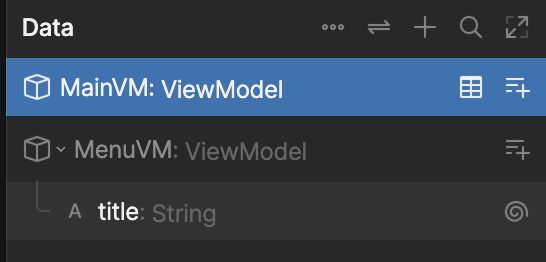
- 在主视模型中创建 menu 属性
为了能在脚本中引用
MenuVM的实例,我们需要在主视模型中创建一个类型为MenuVM的myMenu属性。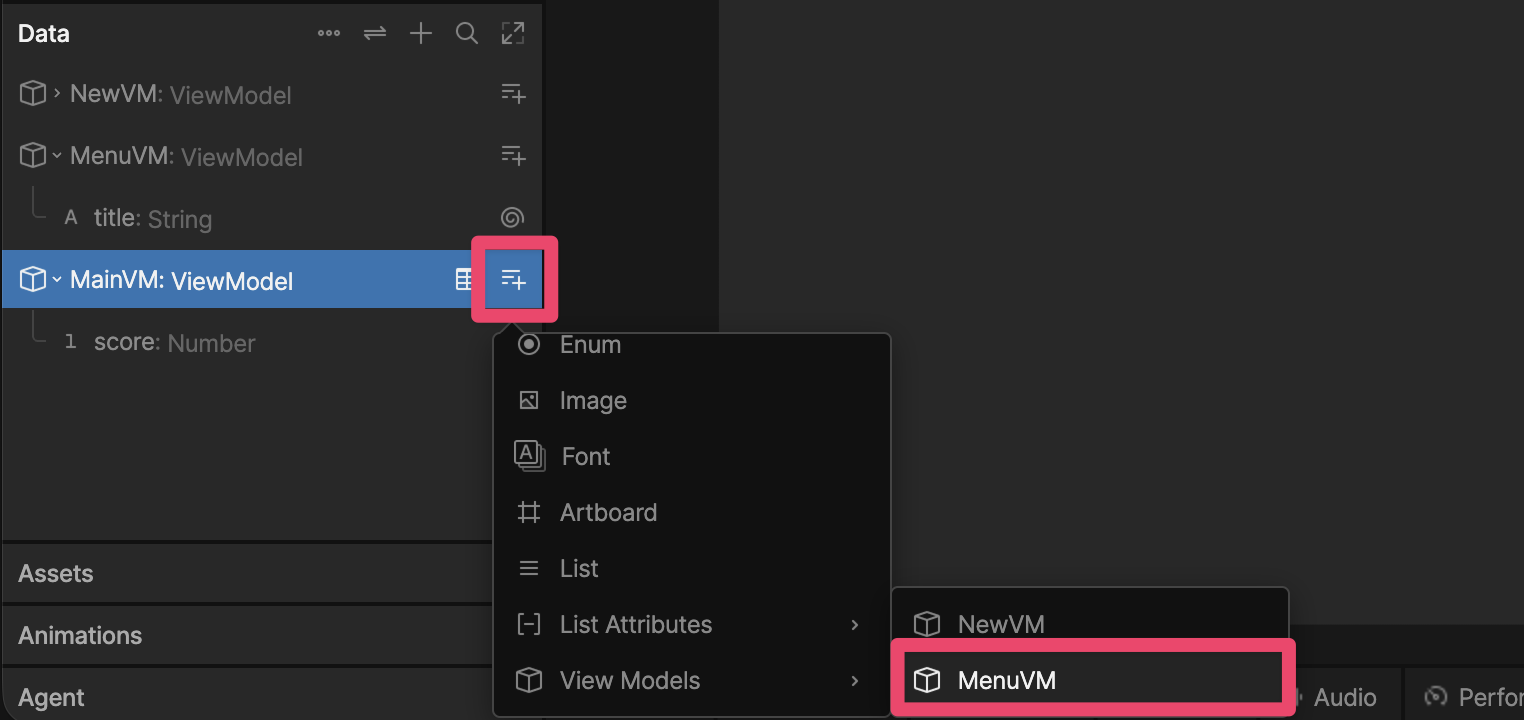
- 在脚本中添加输入
在你的脚本中添加一个类型为
Data.MenuVM的新输入。-- Define the script's data and inputs.
type ScriptInputs = {
myMenu: Input<Data.MenuVM>,
}
-- Called once when the script initializes.
function init(self: ScriptInputs, context: Context): boolean
print(self.myMenu.title.value)
return true
end
-- Return a factory function that Rive uses to build the Node instance.
return function(): Node<ScriptInputs>
return {
init = init,
myMenu = late(),
}
end - 设置输入值
在层级面板中选择脚本,然后在检查器的属性分组面板中,将
myMenu输入设置为menu。
读取与设置属性(Reading and Setting Properties)
以下方法允许你引用视图模型属性:
- getNumber
- getTrigger
- getString
- getBoolean
- getColor
- getList
- getViewModel
- getEnum
- getImage
- getFont
- getBlob
local vmi = context:viewModel()

if vmi then
  -- Get a reference to the score property from the view model
  local score = vmi:getNumber('score')
  if score then
    -- Read the score
    print(score.value)

    -- Set the score
    score.value = 100
  end

  -- Get a reference to the myTrigger property from the view model
  local myTrigger = vmi:getTrigger('myTrigger')
  if myTrigger then
    -- Fire the trigger
    mytrigger:fire()
  end
end
监听属性更改(Listening for Property Changes)
添加监听器(Add a Listener)
使用 addListener 监听触发器或视图模型属性的更改。
-- Define the script's data and inputs.
type ScriptInputs = {
  menu: Input<Data.MenuVM>,
}

function onTitleChange()
  print('changed')
end

function onTitleChangeWithParam(self: ScriptInputs)
  print('changed', self.menu.title.value)
end

-- Called once when the script initializes.
function init(self: ScriptInputs, context: Context): boolean
  local title = self.menu.title

  -- When title changes, call onTitleChange
  title:addListener(onTitleChange)

  -- When title changes, call onTitleChangeWithParam with an argument of self
  title:addListener(self, onTitleChangeWithParam)

  return true
end

-- Return a factory function that Rive uses to build the Node instance.
return function(): Node<ScriptInputs>
  return {
    init = init,
    score = 0,
    menu = late(),
    newArtboard = late(),
  }
end
移除监听器(Remove a Listener)
不再需要监听器时,请始终移除它们以避免内存泄漏。
-- Define the script's data and inputs.
type ScriptInputs = {
  menu: Input<Data.MenuVM>,
}

-- Anchor-form listener callback: receives the same object passed as the
-- anchor to addListener (here, the `title` Property itself).
function onTitleChangeWithParam(title: Property<string>)
  print('title changed:', title.value)

  -- Unsubscribe using the matching anchor-form overload (self, anchor, callback).
  -- The simpler (self, callback) overload requires a zero-argument callback,
  -- which is why using it here caused a type error against this 1-argument function.
  title:removeListener(title, onTitleChangeWithParam)
end

-- Called once when the script initializes.
function init(self: ScriptInputs, context: Context): boolean
  local title = self.menu.title

  -- When title changes, call onTitleChangeWithParam with the anchor (title) as its argument.
  title:addListener(title, onTitleChangeWithParam)

  return true
end

-- Return a factory function that Rive uses to build the Node instance.
return function(): Node<ScriptInputs>
  return {
    init = init,
    menu = late(),
  }
end
创建视图模型实例(Creating a View Model Instance)
-- Define the script's data and inputs.
type ScriptInputs = {
  menu: Input<Data.MenuVM>,
}

-- Called once when the script initializes.
function init(self: ScriptInputs, context: Context): boolean
  -- Create a brand new MenuVM ViewModel instance programmatically
  -- (instead of relying on the data-bound `menu` input from the editor).
  local newMenuInstance = Data.MenuVM.new()

  local newTitle = newMenuInstance:getString('title')
  if newTitle then
    newTitle.value = 'Created at runtime'
  end

  -- Swap self.menu to use the instance we just created programmatically.
  self.menu = newMenuInstance

  local title = self.menu.title

  print('menu title after programmatic creation:', title.value)

  return true
end

-- Return a factory function that Rive uses to build the Node instance.
return function(): Node<ScriptInputs>
  return {
    init = init,
    menu = late(),
  }
end